
Luminus LU740 IP65 · Operating Manual · 16 pages
Model LU740 IP65Edition EN · 04 / 2026 · V1Dokument-Nr. LU740IP-EN-01
IP65 Wash Zoom Moving Head · Bee-Eye Effect

LU740 IP65

Weatherproof wash zoom moving head with 7 × 40 W RGBW 4-in-1 LEDs, bee-eye effect, continuously rotating lens, pixel control and four channel modes up to 60 channels

Operating manual. Please read in full before first use and keep for future reference.

Light source
7 × 40 WRGBW 4-in-1
Zoom
3,5° – 45°motorized
DMX channels
21–604 channel modes
IP rating
IP65Outdoor
Foreword

00Welcome

Thank you for choosing the Luminus LU740 IP65 — a weatherproof wash zoom moving head with 7 × 40 W RGBW 4-in-1 LEDs, a bee-eye effect from the continuously rotating lens, individually addressable pixels and outstanding color macro effects.

The product has full capability and intact packing when leaving the factory. All users should comply with the warnings and this manual. Damage caused by misuse is not included in our guarantee, and we cannot be responsible for any malfunction or problem owing to ignoring the manual. Keep this user guide for future consultation and be sure it accompanies the unit if you sell it to another user.

0.1Features

Table of Contents

Overview

  1. 01Safety Instructions04
  2. 02Technical Specifications05
  3. 03Control & Menu06
  4. 04DMX Channel Charts (4 channel modes, complete)08
  5. 4.121-Channel Mode08
  6. 4.224-Channel Mode09
  7. 4.332-Channel Mode11
  8. 4.460-Channel Mode (pixel mode)13
  9. 05Trouble Shooting15
  10. 06Fixture Cleaning16
  11. CE Compliance Notice17

Chapter 01

01Safety Instructions

Earthing MandatoryIt is important to ground the yellow/green conductor to earth in order to avoid electric shock. Do not touch any wire during operation as high voltage might cause electric shock. Disconnect main power before replacement or servicing.
WarningTo prevent or reduce the risk of electrical shock or fire, do not expose the unit to rain or moisture. Do not open the unit within five minutes after switching off. The housing, the lenses, or the ultraviolet filter must be replaced if they are visibly damaged. There are no user-serviceable parts inside the unit.

1.1Installation

The unit should be mounted via its screw holes on the bracket. Always ensure that the unit is firmly fixed to avoid vibration and slipping while operating. The structure to which the unit is attached must be able to support 10 times the weight of the unit; also always use a safety cable that can hold 12 times the weight of the unit. The equipment must be fixed by professionals and must be installed out of the reach of people.

Chapter 02

02Technical Specifications

Light Source & Optics

Light sources7 × 40 W RGBW 4-in-1 LED-Chips
Beam angle3,5° – 45° (datasheet: 5°–45°)
OpticsGlass light guide + PMMA high-quality optical lens
ZoomMotorized linear zoom system, 6° – 45°
Lens rotation0–60° indexed plus continuous rotation in both directions (bee-eye effect)
Pixels7 pixels individually addressable (RGBW per pixel)
Color effects20 macro colors, linear color temperature, 20 monochrome and 13 mixed-color dynamic patterns
Dimmer0–100 % smooth dimming, four dimming modes
Strobe1 – 25 Hz, synchro and random strobe

Movement & Control

Pan / Tilt540° / 270°
Resolution8 / 16 bit, photoelectric reset system
Pan range540° or 360°, selectable in the menu
DMX channels21 / 24 / 32 / 60 CH
Control modesDMX-512 · Master/Slave · Auto Run · Music · RDM
Display1.8" TFT color display (datasheet: 2.0"), 4 buttons
Data in/out3-pin XLR sockets (5-pin optional)

Electrical & Construction

Power voltageAC 100 – 240 V, 50/60 Hz
Power consumption240 W (datasheet: 380 W power supply)
Power socketPowerCon in/out (Seetronic IP65)
Protection ratingIP65 — Outdoor
CoolingActive, with over-temperature protection
Installation2 × folding clamp · 1 × safety attachment point
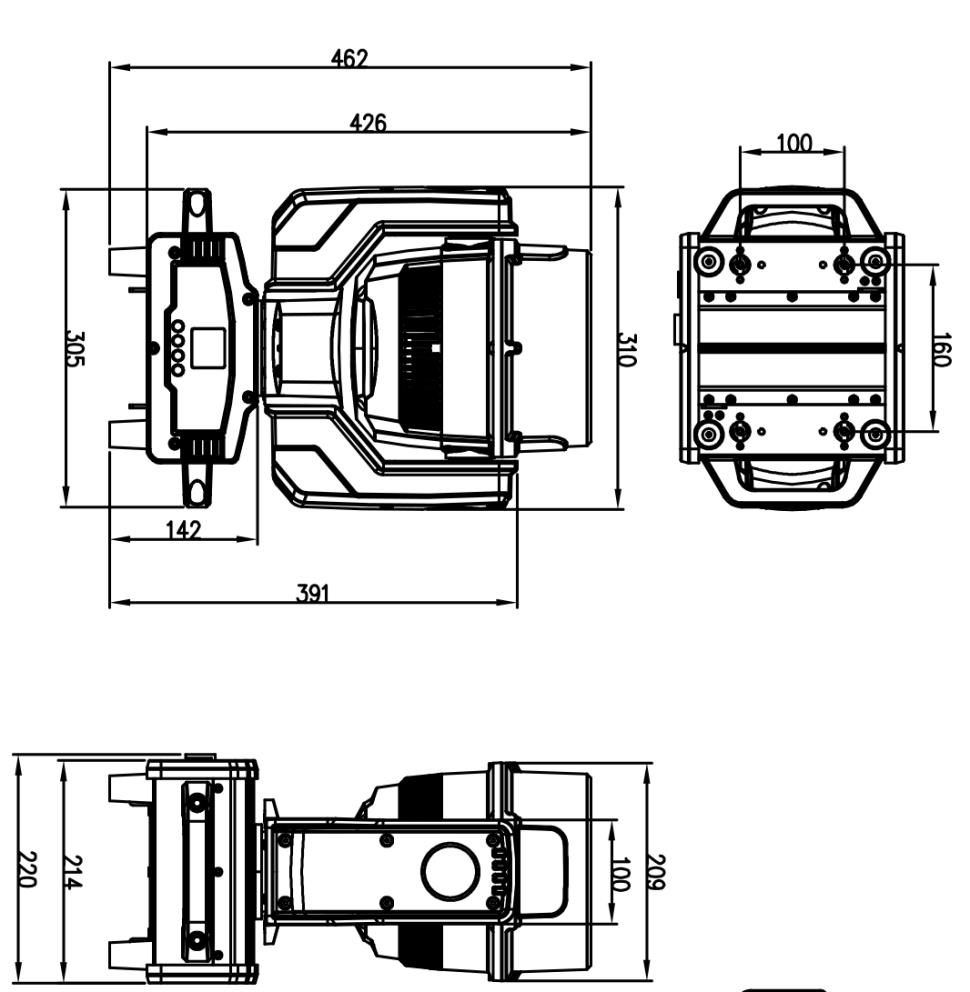
Dimensions258 × 178 × 334 mm
Net weight10,9 kg
PackingCarton (2 in 1) 62.5 × 40 × 59 cm, gross weight 29.5 kg · flight case (4 in 1) 68.5 × 70.5 × 65 cm, gross weight 84.5 kg

Chapter 03

03Control & Menu

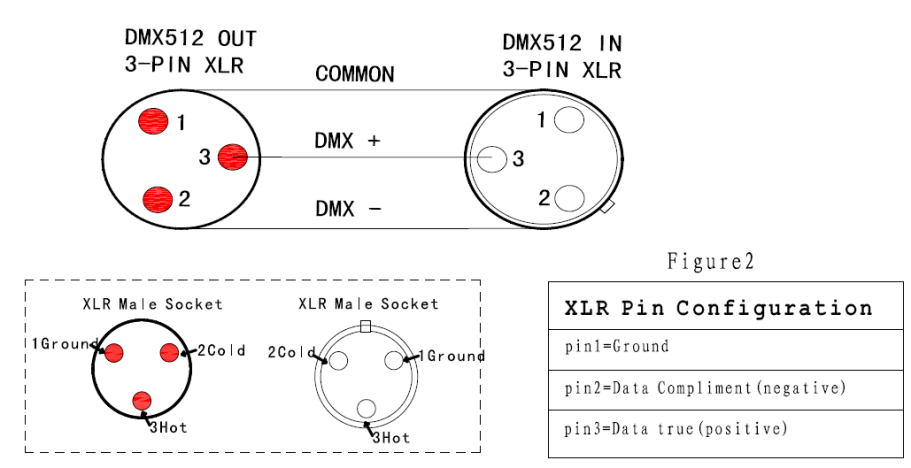
DMX-512 is widely used in intelligent lighting control. With a DMX-512 controller, several fixtures are connected in series via DMX in and DMX out. 3-pin XLR pinout: pin 1 GND, pin 2 negative signal (−), pin 3 positive signal (+).

3.1Button Functions

ButtonFunction
MENUTo select the programming functions
DOWNTo go backward in the selected functions
UPTo go forward in the selected functions
ENTERTo confirm the selected functions

Set DMX address code: Press "MENU" to Set DMX Address and press "ENTER" to enter. The display shows "Set DMX Address — DMX Address:001"; amend the value with the "UP" and "DOWN" keys. "ENTER" saves and exits, "MENU" exits without saving.

3.2Menu Structure

Menu itemOptions / description
AddressAddress setting 001–512
Channel21CH · 24CH · 32CH · 60CH
ModeDMX512 · Auto · Sound (master / alone) · Manual — direct control of pan, tilt, focus, red, green, blue, white and strobe (0–255 each)
Pan DegreePan running angle 540° or 360°
SoundSound control sensitivity 001–100
LanguageEnglish · Chinese
No SignalBlackOut · Hold
Fan SetAuto · Low · High
ReverPan invert NO/YES · tilt invert NO/YES · display invert NO/YES
ResetYes · No
DefaultFactory setting (yes / no)
InformCH Value channel values · Temp temperature of the LED board · Soft program version number
AdjustPassword protected. Change the values of Pan, Tilt, Focus and Rotate to adjust the angle; change the values of Red, Green, Blue and White to adjust the white balance.

Chapter 04

04DMX Channel Charts

4.121-Channel Mode

CHFunctionDescriptionValue
01RedRed dimming000–255
02Red adjustmentRed adjustment000–255
03GreenGreen dimming000–255
04Green adjustmentGreen adjustment000–255
05BlueBlue dimming000–255
06Blue adjustmentBlue adjustment000–255
07WhiteWhite dimming000–255
08White adjustmentWhite adjustment000–255
09Linear color temperatureNo function000–004
Color temperature from warm to cool005–255
10Macro colorNo function000–009
Macro color 1010–019
Macro color 2020–029
… 10 DMX values per macro color …
Macro color 19190–199
Macro color 20200–255
11Dimmerdark to bright linear dimming000–255
12Dimmer adjustDimmer adjustment control000–255
13StrobeTurn on the light / no function000–003
Synchro strobe speed, slow to fast (1 Hz – 25 Hz)004–203
Random strobe204–255
14PanPan control000–255
15Pan adjustmentPan adjustment control000–255
16TiltTilt control000–255
17Tilt adjustmentTilt adjustment control000–255
18ZoomZoom000–255
19Lens rotation0 – 60°000–155
Counter-clockwise infinite rotation, fast to slow156–205
Clockwise rotation, slow to fast206–255
20Dimming modeMode 1000–049
Mode 2050–099
Mode 3100–149
Mode 4150–255
21ResetNo function000–250
Reset within 5 s251–255

4.224-Channel Mode (channel 1–15)

CHFunctionDescriptionValue
01PanPan adjustment000–255
02Pan fine adjustmentPan fine adjustment000–255
03TiltTilt adjustment000–255
04Tilt fine adjustmentTilt fine adjustment (the manufacturer chart prints "Pan fine adjustment" here)000–255
05Speed of pan/tiltfrom fast to slow000–255
06Zoomfrom small to large000–255
07Lens rotation0 – 60°000–155
Counter-clockwise infinite rotation, fast to slow156–205
Clockwise rotation, slow to fast206–255
08Dimmerfrom dark to bright000–255
09StrobeTurn on the light000–003
Synchro strobe speed, slow to fast (1 Hz – 25 Hz)004–203
Random strobe204–255
10Rfrom dark to bright000–255
11Gfrom dark to bright000–255
12Bfrom dark to bright000–255
13Wfrom dark to bright000–255
14Linear color temperatureNo function000–004
Color temperature from warm to cool005–255
15Macro colorNo function000–009
Macro color 1010–019
Macro color 2020–029
… 10 DMX values per macro color …
Macro color 19190–199
Macro color 20200–255

4.224-Channel Mode (channel 16–24)

CHFunctionDescriptionValue
16Pattern rotationNo function000–009
Monochrome dynamic pattern 1010–014
Monochrome dynamic pattern 2015–019
… 5 DMX values per pattern …
Monochrome dynamic pattern 20105–109
Mixed color dynamic pattern 1110–114
Mixed color dynamic pattern 2115–119
… 5 DMX values per pattern …
Mixed color dynamic pattern 12165–169
Mixed color dynamic pattern 13170–255
17Pattern movementPattern movement (with CH 16)000–255
18Pattern effect speed (with CH 16)No function000–009
Forward, from fast to slow010–132
Reverse, from slow to fast133–255
19Background Rlinear dimming from dark to bright000–255
20Background Glinear dimming from dark to bright000–255
21Background Blinear dimming from dark to bright000–255
22Background Wlinear dimming from dark to bright000–255
23Dimming modeMode 1000–049
Mode 2050–099
Mode 3100–149
Mode 4150–255
24ResetNo function000–250
Reset within 5 s251–255

4.332-Channel Mode (channel 1–20)

CHFunctionDescriptionValue
01PanPan adjustment000–255
02Pan fine adjustmentPan fine adjustment000–255
03TiltTilt adjustment000–255
04Tilt fine adjustmentTilt fine adjustment (the manufacturer chart prints "Pan fine adjustment" here)000–255
05Speed of pan/tiltfrom fast to slow000–255
06ZoomZoom000–255
07Lens rotation0 – 60°000–155
Clockwise infinite rotation, fast to slow156–205
Counter-clockwise rotation, slow to fast206–255
08Dimmerfrom dark to bright000–255
09Dimmer adjustDimmer adjustment control000–255
10StrobeTurn on the light000–003
Synchro strobe speed, slow to fast (1 Hz – 25 Hz)004–203
Random strobe204–255
11RRed dimming000–255
12Red adjustRed adjust000–255
13GGreen dimming000–255
14Green adjustGreen adjust000–255
15BBlue dimming000–255
16Blue adjustBlue adjust000–255
17WWhite dimming000–255
18White adjustWhite adjust000–255
19Dimming modeMode 1000–049
Mode 2050–099
Mode 3100–149
Mode 4150–255
20Linear color temperatureNo function000–004
Color temperature from warm to cool005–255

4.332-Channel Mode (channel 21–32)

CHFunctionDescriptionValue
21Macro colorNo function000–009
Macro color 1010–019
Macro color 2020–029
… 10 DMX values per macro color …
Macro color 19190–199
Macro color 20200–255
22Pattern rotationNo function000–009
Monochrome dynamic pattern 1010–014
Monochrome dynamic pattern 2015–019
… 5 DMX values per pattern …
Monochrome dynamic pattern 20105–109
Mixed color dynamic pattern 1110–114
Mixed color dynamic pattern 2115–119
… 5 DMX values per pattern …
Mixed color dynamic pattern 12165–169
Mixed color dynamic pattern 13170–255
23Pattern movementPattern movement (with CH 22)000–255
24Pattern effect speed (with CH 22)No function000–009
Forward, from fast to slow010–132
Reverse, from slow to fast133–255
25Pattern effect fadePattern effect fade000–255
26Background dimmingBackground 0–100 % dimming000–255
27Background strobeBackground strobe000–255
28Background Rfrom dark to bright000–255
29Background Gfrom dark to bright000–255
30Background Bfrom dark to bright000–255
31Background Wfrom dark to bright000–255
32ResetNo function000–250
Reset within 5 s251–255

4.460-Channel Mode — channel 1–32

Channels 1 to 32 are identical to the 32-channel mode (see chapter 4.3). Channels 33 to 60 add individual control of the seven pixels.

CHFunctionDescriptionValue
01PanPan adjustment000–255
02Pan fine adjustmentPan fine adjustment000–255
03TiltTilt adjustment000–255
04Tilt fine adjustmentTilt fine adjustment (the manufacturer chart prints "Pan fine adjustment" here)000–255
05Speed of pan/tiltfrom fast to slow000–255
06ZoomZoom000–255
07Lens rotation0 – 60°000–155
Clockwise infinite rotation, fast to slow156–205
Counter-clockwise rotation, slow to fast206–255
08Dimmerfrom dark to bright000–255
09Dimmer adjustDimmer adjustment control000–255
10StrobeTurn on the light000–003
Synchro strobe speed, slow to fast (1 Hz – 25 Hz)004–203
Random strobe204–255
11RRed dimming000–255
12Red adjustRed adjust000–255
13GGreen dimming000–255
14Green adjustGreen adjust000–255
15BBlue dimming000–255
16Blue adjustBlue adjust000–255
17WWhite dimming000–255
18White adjustWhite adjust000–255
19Dimming modeMode 1000–049
Mode 2050–099
Mode 3100–149
Mode 4150–255
20Linear color temperatureNo function000–004
Color temperature from warm to cool005–255

4.460-Channel Mode — channel 21–32 and pixel channels 33–60

CHFunctionDescriptionValue
21Macro colorNo function000–009
Macro color 1010–019
Macro color 2020–029
… 10 DMX values per macro color …
Macro color 19190–199
Macro color 20200–255
22Pattern rotationNo function000–009
Monochrome dynamic pattern 1010–014
Monochrome dynamic pattern 2015–019
… 5 DMX values per pattern …
Monochrome dynamic pattern 20105–109
Mixed color dynamic pattern 1110–114
Mixed color dynamic pattern 2115–119
… 5 DMX values per pattern …
Mixed color dynamic pattern 12165–169
Mixed color dynamic pattern 13170–255
23Pattern movementPattern movement (with CH 22)000–255
24Pattern effect speed (with CH 22)No function000–009
Forward, from fast to slow010–132
Reverse, from slow to fast133–255
25Pattern effect fadePattern effect fade000–255
26Background dimmingBackground 0–100 % dimming000–255
27Background strobeBackground strobe000–255
28Background Rfrom dark to bright000–255
29Background Gfrom dark to bright000–255
30Background Bfrom dark to bright000–255
31Background Wfrom dark to bright000–255
32ResetNo function000–250
Reset within 5 s251–255
33R1 LEDDimming LED 1 — red000–255
34G1 LEDDimming LED 1 — green000–255
35B1 LEDDimming LED 1 — blue000–255
36W1 LEDDimming LED 1 — white000–255
37R2 LEDDimming LED 2 — red000–255
38G2 LEDDimming LED 2 — green000–255
39B2 LEDDimming LED 2 — blue000–255
40W2 LEDDimming LED 2 — white000–255
41R3 LEDDimming LED 3 — red000–255
42G3 LEDDimming LED 3 — green000–255
43B3 LEDDimming LED 3 — blue000–255
44W3 LEDDimming LED 3 — white000–255
45R4 LEDDimming LED 4 — red000–255
46G4 LEDDimming LED 4 — green000–255
47B4 LEDDimming LED 4 — blue000–255
48W4 LEDDimming LED 4 — white000–255
49R5 LEDDimming LED 5 — red000–255
50G5 LEDDimming LED 5 — green000–255
51B5 LEDDimming LED 5 — blue000–255
52W5 LEDDimming LED 5 — white000–255
53R6 LEDDimming LED 6 — red000–255
54G6 LEDDimming LED 6 — green000–255
55B6 LEDDimming LED 6 — blue000–255
56W6 LEDDimming LED 6 — white000–255
57R7 LEDDimming LED 7 — red000–255
58G7 LEDDimming LED 7 — green000–255
59B7 LEDDimming LED 7 — blue000–255
60W7 LEDDimming LED 7 — white000–255

All pixel channels dim linearly from 000 (dark) to 255 (bright). Pixels 1 to 7 correspond to the seven LED positions in the head.

Chapter 05

05Trouble Shooting

Following are a few common problems that may occur during operation, with suggestions for easy troubleshooting.

A. The unit does not work, no light and the fan does not work

  1. Check the connection of power and the main fuse.
  2. Measure the mains voltage on the main connector.
  3. Check the power-on LED.

B. Not responding to the DMX controller

  1. The DMX LED should be on. If not, check DMX connectors and cables to see if they link properly.
  2. If the DMX LED is on and there is no response on the channel, check the address settings and DMX polarity.
  3. If you have intermittent DMX signal problems, check the pins on the connectors or on the PCB of this unit or the previous one.
  4. Try to use another DMX controller.
  5. Check whether the DMX cables run near or alongside high-voltage cables, which may cause damage or interference to the DMX interface circuit.

C. One of the channels is not working well

  1. The stepper motor might be damaged or the cable connected to the PCB is broken.
  2. The motor drive IC on the PCB might be out of condition.

Chapter 06

06Fixture Cleaning

The cleaning of internal and external optical lenses and/or mirrors must be carried out periodically to optimize light output. Cleaning frequency depends on the environment in which the fixture operates: damp, smoky or particularly dirty surroundings can cause greater accumulation of dirt on the optics.

Disconnect from Mains before CleaningThere are no user-serviceable parts inside the unit. Do not open the housing or attempt any repairs yourself. In the unlikely event your unit requires service, please contact your nearest dealer.

Appendix

CE Compliance Notice

The manufacturer declares under its sole responsibility that the LU740 IP65 complies with the relevant EU harmonization legislation.

Applied EU Directives

Applied Harmonized Standards

The signed EU Declaration of Conformity is available as a separate document upon request from the manufacturer.